Back to the manuals overview

Log in via your web browser at http://192.168.1.1
Default Username and Password are both admin
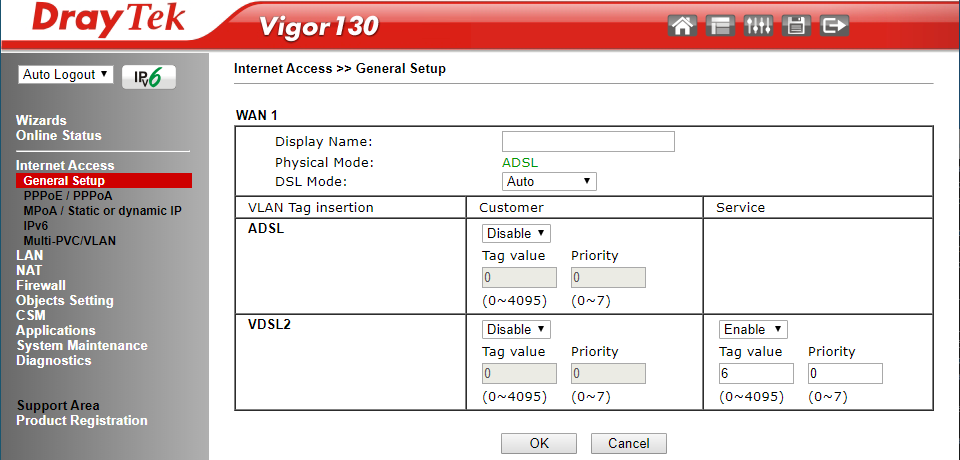
In the left menu, go to Internet Access > General Setup
Enable Enable on the Service side of VDSL2
The Tag Value must be set to 6.
Click Ok and ignore the reboot prompt that follows
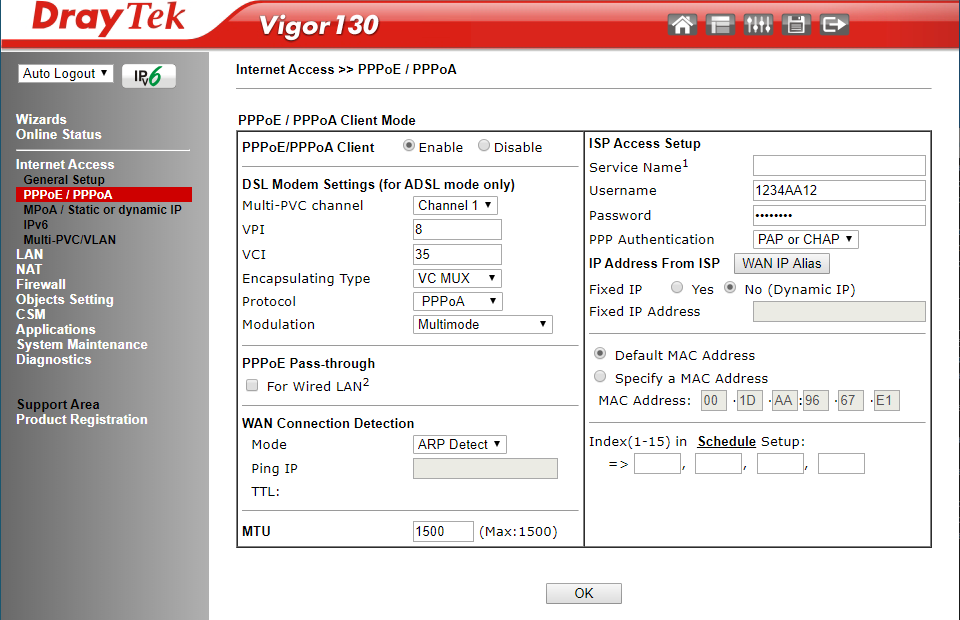
In the left menu, go to Internet Access > PPPoE / PPPoA
Set PPPoE/PPPoA Client to Enable
Under PPPoE Pass-through, uncheck the For Wired LAN2 option
Then, under ISP Access Setup, enter the username and password you received from us.
Click OK and then reboot the modem.
You've now successfully configured your modem!
Internet: Draytek Vigor 130 (VDSL)
(Assumes you're starting from factory settings)
Step 1: Log in
Log in via your web browser at http://192.168.1.1
Default Username and Password are both admin
Step 2: VLAN information
In the left menu, go to Internet Access > General Setup
Enable Enable on the Service side of VDSL2
The Tag Value must be set to 6.
Click Ok and ignore the reboot prompt that follows
Step 3: PPPoE information
In the left menu, go to Internet Access > PPPoE / PPPoA
Set PPPoE/PPPoA Client to Enable
Under PPPoE Pass-through, uncheck the For Wired LAN2 option
Then, under ISP Access Setup, enter the username and password you received from us.
Click OK and then reboot the modem.
You've now successfully configured your modem!

